
- Change what is sent to the platform: a request function receives the outgoing request and can return a modified one (different body, headers or URL).
- Change what comes back: a response function receives the platform’s response and can return a modified one, for example to add a computed field the checkout then exposes under
session.extensions. - Answer a call yourself: a request function that returns a
Responseskips the platform entirely. Used for validations and for rejecting an action with a message the shopper sees. - Remember things across calls with a per-shopper session storage, and set cookies on the shopper’s browser.
- Call other systems (fraud checks, ERP validation, pricing services) using secrets from the store’s Environment Variables.
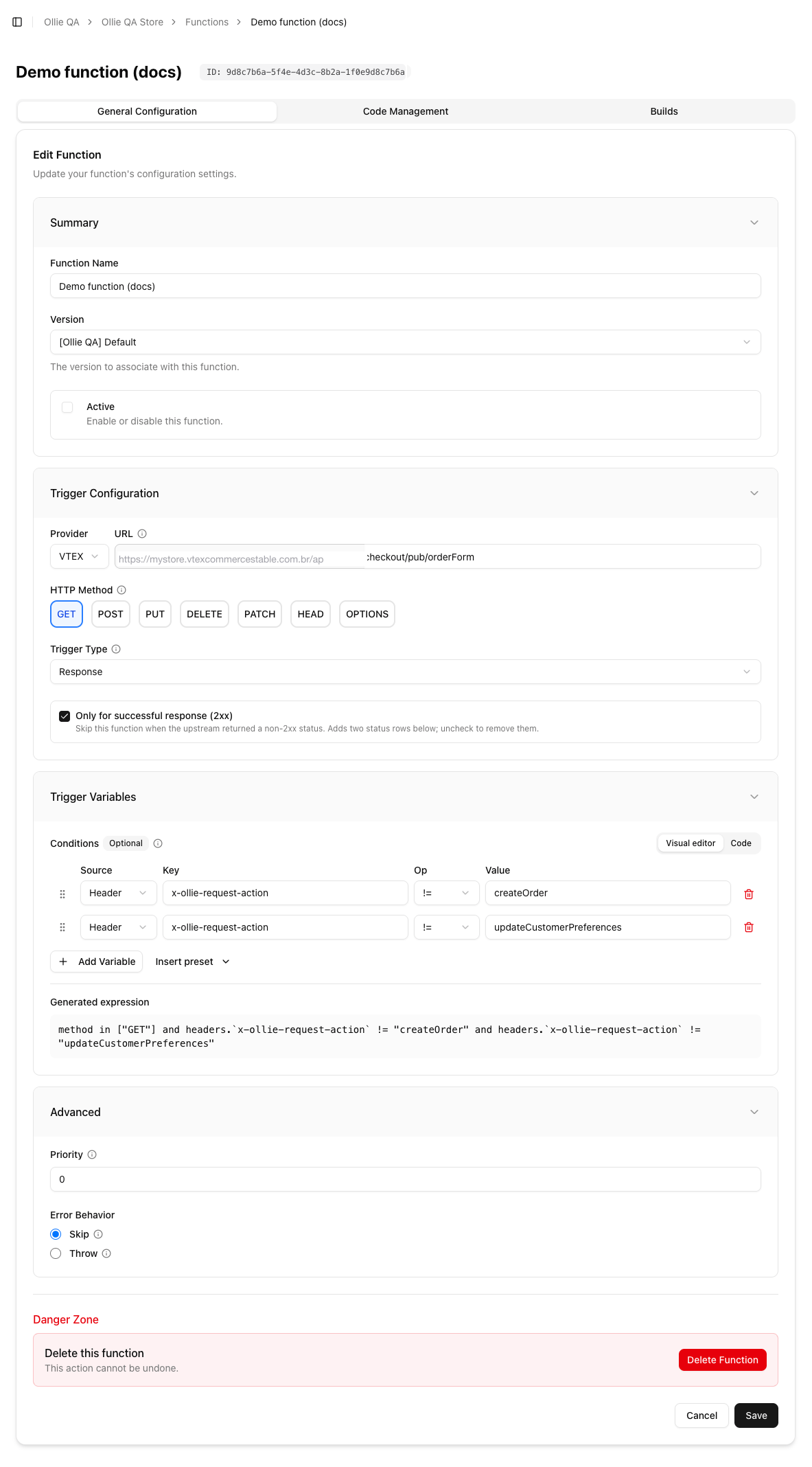
A function in the Admin: trigger URL, HTTP method, trigger type, conditions, priority and error behaviour
The two kinds
All matching request functions run first, in priority order, then the platform is called once, then all matching response functions run. Details and the full contract are in Writing a function.
What a function sees
Only calls the checkout server makes to the platform pass through the hub. That covers the cart and checkout API (orderForm, items, attachments, coupons, simulation, pickup points, the order page) and any URL a custom component requests through the REQUEST action of useCheckoutAction. It does not cover card payment submissions (they go straight from the browser to the payment vault), installment lookups, or anything the shopper’s browser fetches directly. Triggers lists the endpoints.
Where functions live
Each function is a record in a store version with a trigger, a type, a priority and an error policy, plus the code you deploy to it. You create the record in the Admin (Functions → Create Function) or with the CLI, write the code in your project’sfunctions/<name>/ folder, test it with ollieshop function dev, and ship it with ollieshop deploy. See Deploying a function.
Limits worth knowing up front
- A function has 5 seconds to run, including any external call it makes. Keep remote calls short and set your own timeouts.
- Functions run on their own servers, not in the shopper’s browser: no
window, no DOM. - Session storage holds about 2 KB per shopper; it is for ids and small flags, not for copies of the cart.
- If a function with error behaviour Throw fails, the checkout call fails and the shopper sees a generic error. Prefer Skip for anything that is not a hard rule, and handle your own errors.
Next
Writing a function
The handler contract, return values, chaining, errors and limits
Triggers
Which calls to intercept and the condition language
Session storage and cookies
Remembering things per shopper
Deploying
From the record in the Admin to a live function