> ## Documentation Index
> Fetch the complete documentation index at: https://docs.ollie.shop/llms.txt
> Use this file to discover all available pages before exploring further.

# Custom Component 101

## **How to customize your checkout**

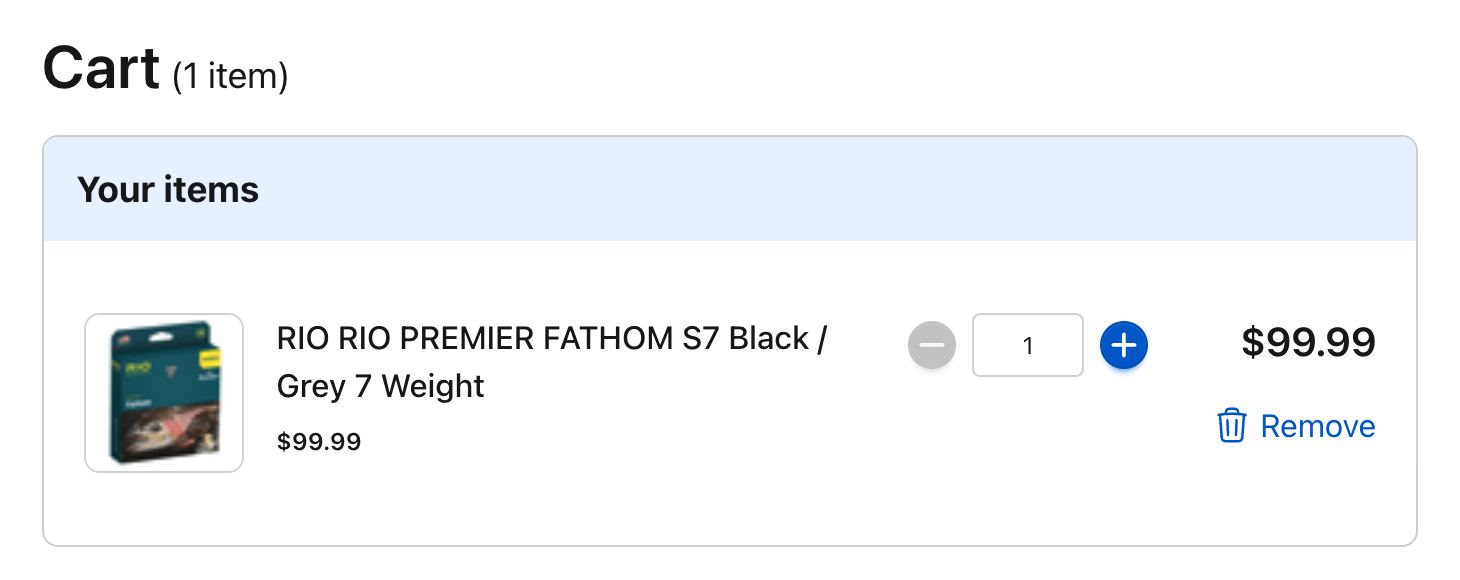
This guide will help you customize your checkout by creating a fully custom `CartItem` component.

We’ll be creating a component from scratch that allows customers to view items in their cart, retrieve the currency and language from the `session`  using the  [`useCheckoutSession`](/ollie-shop/api/useCheckoutSession) hook to properly format the currency, update quantities, and remove items using the [`useCheckoutAction`](/ollie-shop/api/useCheckoutAction) hook and show alerts using the [`useMessages`](/ollie-shop/api/useMessages) hook.

<Frame>
  <img src="https://mintcdn.com/ollie/UatGh8GLCugPlVFB/images/cart-item.png?fit=max&auto=format&n=UatGh8GLCugPlVFB&q=85&s=34e279d21b587f8a8c5007001b4e9964" alt="Cart Item Pn" width="1460" height="580" data-path="images/cart-item.png" />
</Frame>

## **Prerequisites**

* Ollie Shop [SDK](/ollie-shop/api/index) installed
* An [Ollie Shop](https://admin.ollie.shop) store

<Warning>
  This tutorial will use the hooks available via the SDK. To learn more about them you can review the [Hooks](/ollie-shop/api/index) documentation. We recommended going through the [quickstarter](/ollie-shop/get-started/quickstart) guide first.
</Warning>

## **Custom "Cart Item" Component**

<Steps>
  <Step title="Folder Structure" icon="folders">
    First, We will create a new folder for our project, called `'CartItem'`. Inside this folder, let's add the basic UI structure for our `CartItem` component.

    Create a new file called `'index.tsx'` and add the following code:

    ```typescript index.tsx expandable theme={"system"}
    import React from "react";
    import styles from "./cartItem.module.css";

    // Define a simple CartItem type
    type CartItemType = {
      id: string;
      name: string;
      quantity: number;
      price: number;
      originalPrice?: number;
      available: boolean;
      index: number;
      image?: string;
      url: string;
    };

    export default function CartItem({
      item = {
        id: "1",
        name: "Product Name",
        quantity: 1,
        price: 10000,
        originalPrice: 12000,
        available: true,
        index: 0,
        category: "category";
        image: "https://example.com/image.jpg",
        url?: "/product-name/p",
      },
    } : {
      item: CartItemType;
    }) {
      const hasDiscount = item.originalPrice && item.price !== item.originalPrice;
      
      return (
        <div className={styles.cartItem}>
          {/* Product Image */}
          <div className={styles.imageContainer}>
            {item.image ? (
              <img src={item.image} alt={item.name} className={styles.itemImage} />
            ) : (
              <div className={styles.placeholderImage} />
            )}
          </div>
          
          {/* Product Details */}
          <div className={styles.itemDetails}>
            <h3 className={styles.itemName}>{item.name}</h3>

            {/* Price Display with Discount Logic */}
            {hasDiscount ? (
              <div className={styles.priceContainer}>
                <p className={styles.originalPrice}>
                  {item.originalPrice}
                </p>
                <p className={styles.itemPrice}>{item.price}</p>
              </div>
            ) : (
              <p className={styles.itemPrice}>{item.price}</p>
            )}
          </div>
          
          {/* Quantity Controls - Will add functionality later */}
          <div className={styles.itemActions}>
            <div className={styles.quantityControl}>
              <button
                type="button"
                className={styles.quantityButton}
                disabled={item.quantity <= 1}
                aria-label="Decrease quantity"
              >
                -
              </button>
              <span className={styles.quantity}>{item.quantity}</span>
              <button
                className={styles.quantityButton}
                type="button"
                aria-label="Increase quantity"
              >
                +
              </button>
            </div>

            {/* Remove Button - Will add functionality later */}
            <button
              className={styles.removeButton}
              type="button"
              aria-label="Remove item"
            >
              <span>Remove</span>
            </button>
          </div>
          
          {/* Total Price */}
          <b className={styles.itemTotal}>
            {item.price * item.quantity}
          </b>
        </div>
      );
    }
    ```
  </Step>

  <Step title="Add styling" icon="palette">
    Create a CSS module file named `cartItem.module.css` with the following styles:

    ```css cartItem.module.css expandable theme={"system"}
    .cartItem {
      display: grid;
      grid-template-columns: 100px 1fr auto auto;
      align-items: center;
      gap: 16px;
      padding: 16px;
      border-bottom: 1px solid #e0e0e0;
    }

    .imageContainer {
      width: 80px;
      height: 80px;
    }

    .itemImage {
      width: 100%;
      height: 100%;
      object-fit: cover;
      border-radius: 4px;
    }

    .placeholderImage {
      width: 100%;
      height: 100%;
      background-color: #f0f0f0;
      border-radius: 4px;
    }

    .itemDetails {
      display: flex;
      flex-direction: column;
      gap: 4px;
    }

    .itemName {
      margin: 0;
      font-size: 16px;
      font-weight: 500;
    }

    .priceContainer {
      display: flex;
      align-items: center;
      gap: 8px;
    }

    .originalPrice {
      text-decoration: line-through;
      color: #888;
      margin: 0;
    }

    .itemPrice {
      margin: 0;
      font-weight: 500;
    }

    .itemActions {
      display: flex;
      flex-direction: column;
      gap: 8px;
      align-items: center;
    }

    .quantityControl {
      display: flex;
      align-items: center;
      border: 1px solid #e0e0e0;
      border-radius: 4px;
    }

    .quantityButton {
      border: none;
      background-color: transparent;
      padding: 4px 8px;
      cursor: pointer;
      font-size: 16px;
    }

    .quantityButton:disabled {
      opacity: 0.5;
      cursor: not-allowed;
    }

    .quantity {
      padding: 0 8px;
      min-width: 24px;
      text-align: center;
    }

    .removeButton {
      background-color: transparent;
      border: none;
      color: #ff4d4f;
      cursor: pointer;
      padding: 4px;
      font-size: 14px;
    }

    .itemTotal {
      font-weight: 700;
    }
    ```
  </Step>

  <Step title="Add Session" icon="chevrons-right">
    The first two steps were very simple. It's a simple react component, which you could have easily created yourself with any AI Coding Agent.

    The fun starts now. With the component in place we need to get this component to interact with your ecommerce provider.

    We've built an SDK with some React Hooks to make this super easy.

    Let's enhance our `CartItem` component to use the `useCheckoutSession` hook to access session data. This will allow us to use the session's currency and language settings.

    <Tip>
      Take a look at our [SDK](/ollie-shop/api/index) docs for a refresher on the concepts
    </Tip>

    <Steps>
      <Step title="Import the useCheckoutSession hook from the Ollie SDK">
        Update the `'index.tsx'` file to import the `useCheckoutSession` hook from the SDK

        ```typescript index.tsx theme={"system"}
        import { useCheckoutSession, type CheckoutSession } from "@ollie-shop/sdk";
        ```
      </Step>

      <Step title="Delete the original CartItemType">
        Now we can **delete** the original `CartItemType` because the SDK already exports a type

        ```typescript index.tsx theme={"system"}
        // Delete this snippet from the original code
        type CartItemType = {
          id: string;
          name: string;
          quantity: number;
          price: number;
          originalPrice?: number;
          available: boolean;
          index: number;
          image?: string;
          url: string;
        };
        ```
      </Step>

      <Step title="Update the CartItem to be of type CheckoutSession">
        In the `CartItem` component we'll declare the item to be of type `CheckoutSession`

        ```typescript index.tsx theme={"system"}
        export default function CartItem({
          item = {
            id: "1",
            name: "Product Name",
            quantity: 1,
            price: 10000,
            originalPrice: 12000,
            available: true,
            index: 0,
            image: "https://example.com/image.jpg",
            url: "/product-name/p",
          },
        } : {
          item: CheckoutSession['cartItems'][number];
        }) {
          const { session } = useCheckoutSession();
          const { currency, language } = session.locale;
        ```
      </Step>

      <Step title="Format Price">
        To make our component prettier let's include a function that formats the price according to the `currency` which is imported from the `CheckoutSession`

        ```typescript index.tsx theme={"system"}
          // Format price utility function
          const formatPrice = (price: number) => {
            return new Intl.NumberFormat(language, {
              style: "currency",
              currency: currency,
            }).format(price / 100);
          };

        ...
        ```
      </Step>

      <Step title="Update the HTML Component to use the formatPrice function">
        ```html index.tsx expandable theme={"system"}
        ...
        //update the HTML to use formatPrice

        return (
            <div className={styles.cartItem}>
              {/* Product Image */}
              <div className={styles.imageContainer}>
                {item.image ? (
                  <img src={item.image} alt={item.name} className={styles.itemImage} />
                ) : (
                  <div className={styles.placeholderImage} />
                )}
              </div>
              
              {/* Product Details */}
              <div className={styles.itemDetails}>
                <h3 className={styles.itemName}>{item.name}</h3>

                {/* Price Display with Discount Logic */}
                {hasDiscount ? (
                  <div className={styles.priceContainer}>
                    <p className={styles.originalPrice}>
                      {formatPrice(item.originalPrice)}
                    </p>
                    <p className={styles.itemPrice}>{formatPrice(item.price)}</p>
                  </div>
                ) : (
                  <p className={styles.itemPrice}>{formatPrice(item.price)}</p>
                )}
              </div>
              
              {/* Quantity Controls - Will add functionality later */}
              <div className={styles.itemActions}>
                <div className={styles.quantityControl}>
                  <button
                    type="button"
                    className={styles.quantityButton}
                    disabled={item.quantity <= 1}
                    aria-label="Decrease quantity"
                  >
                    -
                  </button>
                  <span className={styles.quantity}>{item.quantity}</span>
                  <button
                    className={styles.quantityButton}
                    type="button"
                    aria-label="Increase quantity"
                  >
                    +
                  </button>
                </div>

                {/* Remove Button - Will add functionality later */}
                <button
                  className={styles.removeButton}
                  type="button"
                  aria-label="Remove item"
                >
                  <span>Remove</span>
                </button>
              </div>
              
              {/* Total Price */}
              <b className={styles.itemTotal}>
                {formatPrice(item.price * item.quantity)}
              </b>
            </div>
          );
        }
        ```
      </Step>
    </Steps>
  </Step>

  <Step title="Add Update / Remove Actions to the Component" icon="chevrons-right">
    Now let's add functionality to **update quantities and remove items**. These actions already exist in the Ollie SDK

    <Steps>
      <Step title="Import the useCheckoutAction hook from the Ollie SDK">
        In the `index.tsx` file, update the `import` to include the`useCheckoutAction`

        ```typescript index.tsx theme={"system"}
        import {
          useCheckoutAction, // Add this import
          useCheckoutSession,
          type CheckoutSession
        } from "@ollie-shop/sdk";
        ```
      </Step>

      <Step title="Include Actions">
        Add the action hooks for removing items and updating quantities:

        ```typescript index.tsx theme={"system"}
        // Add actions for removing items
        const { execute: executeActionRemoveItems } =
          useCheckoutAction("REMOVE_ITEMS");

        // Add actions for updating item quantity
        const { execute: executeActionUpdateItemsQuantity } = useCheckoutAction(
          "UPDATE_ITEMS_QUANTITY"
        );
        ```
      </Step>

      <Step title="Create functions that manipulate the item">
        Create handler functions for quantity changes and item removal:

        ```typescript index.tsx theme={"system"}
        // Handler for quantity changes
        const handleQuantityChange = async (index: number, newQuantity: number) => {
          if (newQuantity <= 0) return;
          executeActionUpdateItemsQuantity([
            { index, quantity: newQuantity },
          ]);
        };

        // Handler for removing an item
        const handleRemoveItem = async (index: number) => {
          executeActionRemoveItems([index]);
        };
        ```
      </Step>

      <Step title="Update the buttons in your react component">
        Update the button components to use these handlers:

        ```html index.tsx theme={"system"}
        {/* Quantity Controls - Now with functionality */}
        <div className={styles.quantityControl}>
          <button
            type="button"
            className={styles.quantityButton}
            onClick={() => handleQuantityChange(item.index, item.quantity - 1)}
            disabled={item.quantity <= 1}
            aria-label="Decrease quantity"
          >
            -
          </button>
          <span className={styles.quantity}>{item.quantity}</span>
          <button
            className={styles.quantityButton}
            type="button"
            onClick={() => handleQuantityChange(item.index, item.quantity + 1)}
            aria-label="Increase quantity"
          >
            +
          </button>
        </div>

        {/* Remove Button - Now with functionality */}
        <button
          className={styles.removeButton}
          type="button"
          onClick={() => handleRemoveItem(item.index)}
          aria-label="Remove item"
        >
          <span>Remove</span>
        </button>
        ```
      </Step>
    </Steps>
  </Step>

  <Step title="Add the alerts (messages)" icon="badge-check">
    Let's add feedback messages to inform users when actions succeed or fail. Here are the specific changes needed:

    <Steps>
      <Step title="Import the useMessages hook from the Ollie SDK">
        First, update the imports to include `useMessages`:

        ```typescript index.tsx theme={"system"}
        import {
          useMessages, // Add this import
          useCheckoutAction,
          useCheckoutSession,
          type CheckoutSession
        } from "@ollie-shop/sdk";
        ```
      </Step>

      <Step title="Include message action">
        Add the message hook to access the `messages` system:

        ```typescript index.tsx theme={"system"}
        // Add message hook
        const { addMessage } = useMessages();
        ```
      </Step>

      <Step title="Include the message hook to the functions">
        Update the action hooks to include success and error handlers:

        ```typescript index.tsx theme={"system"}
        // Add actions with success and error messages
        const { execute: executeActionRemoveItems } =
          useCheckoutAction("REMOVE_ITEMS", {
            onSuccess() {
              addMessage({
                type: "success",
                content: "Item removed successfully.",
              });
            },
            onError({ serverError }) {
              addMessage({
                type: "error",
                content:
                  serverError?.message ??
                  "Failed to remove item. Please try again later or contact support.",
              });
            },
          });

        // Add actions for updating item quantity with messages
        const { execute: executeActionUpdateItemsQuantity } = useCheckoutAction(
          "UPDATE_ITEMS_QUANTITY", {
            onSuccess() {
              addMessage({
                type: "success",
                content: "Quantity updated successfully.",
              });
            },
            onError({ serverError }) {
              addMessage({
                type: "error",
                content:
                  serverError?.message ??
                  "Failed to update quantity. Please try again later or contact support.",
              });
            },
          }
        );
        ```
      </Step>
    </Steps>
  </Step>

  <Step title="Final Code" icon="code">
    Here's the complete CartItem component with all features implemented:

    <CodeGroup>
      ```typescript index.tsx expandable theme={"system"}
      import React from "react";
      import {
        useCheckoutAction,
        useCheckoutSession,
        useMessages,
        type CheckoutSession
      } from "@ollie-shop/sdk";
      import styles from "./cartItem.module.css";

      export default function CartItem({
        item = {
          id: "1",
          name: "Product Name",
          quantity: 1,
          price: 10000,
          originalPrice: 12000,
          available: true,
          index: 0,
          image: "https://example.com/image.jpg",
          url: "/product-name/p",
        },
      } : {
        item: CheckoutSession['cartItems'][number];
      }) {
        const { session } = useCheckoutSession();
        const { addMessage } = useMessages();
        
        const { currency, language } = session.locale;
        
        const hasDiscount = item.originalPrice && item.price !== item.originalPrice;
        
        // Add actions with success and error messages
        const { execute: executeActionRemoveItems } =
          useCheckoutAction("REMOVE_ITEMS", {
            onSuccess() {
              addMessage({
                type: "success",
                content: "Item removed successfully.",
              });
            },
            onError({ serverError }) {
              addMessage({
                type: "error",
                content:
                  serverError?.message ??
                  "Failed to remove item. Please try again later or contact support.",
              });
            },
          });

        // Add actions for updating item quantity with messages
        const { execute: executeActionUpdateItemsQuantity } = useCheckoutAction(
          "UPDATE_ITEMS_QUANTITY", {
            onSuccess() {
              addMessage({
                type: "success",
                content: "Quantity updated successfully.",
              });
            },
            onError({ serverError }) {
              addMessage({
                type: "error",
                content:
                  serverError?.message ??
                  "Failed to update quantity. Please try again later or contact support.",
              });
            },
          }
        );

        // Handler for quantity changes
        const handleQuantityChange = async (index: number, newQuantity: number) => {
          if (newQuantity <= 0) return;
          executeActionUpdateItemsQuantity([
            { index, quantity: newQuantity },
          ]);
        };

        // Handler for removing an item
        const handleRemoveItem = async (index: number) => {
          executeActionRemoveItems([index]);
        };
        
        // Format price utility function
        const formatPrice = (price: number) => {
          return new Intl.NumberFormat(language, {
            style: "currency",
            currency: currency,
          }).format(price / 100);
        };

        return (
          <div className={styles.cartItem}>
            {/* Product Image */}
            <div className={styles.imageContainer}>
              {item.image ? (
                <img src={item.image} alt={item.name} className={styles.itemImage} />
              ) : (
                <div className={styles.placeholderImage} />
              )}
            </div>
            
            {/* Product Details */}
            <div className={styles.itemDetails}>
              <h3 className={styles.itemName}>{item.name}</h3>

              {/* Price Display with Discount Logic */}
              {hasDiscount ? (
                <div className={styles.priceContainer}>
                  <p className={styles.originalPrice}>
                    {formatPrice(item.originalPrice)}
                  </p>
                  <p className={styles.itemPrice}>{formatPrice(item.price)}</p>
                </div>
              ) : (
                <p className={styles.itemPrice}>{formatPrice(item.price)}</p>
              )}
            </div>
            
            {/* Quantity Controls */}
            <div className={styles.itemActions}>
              <div className={styles.quantityControl}>
                <button
                  type="button"
                  className={styles.quantityButton}
                  onClick={() => handleQuantityChange(item.index, item.quantity - 1)}
                  disabled={item.quantity <= 1}
                  aria-label="Decrease quantity"
                >
                  -
                </button>
                <span className={styles.quantity}>{item.quantity}</span>
                <button
                  className={styles.quantityButton}
                  type="button"
                  onClick={() => handleQuantityChange(item.index, item.quantity + 1)}
                  aria-label="Increase quantity"
                >
                  +
                </button>
              </div>

              {/* Remove Button */}
              <button
                className={styles.removeButton}
                type="button"
                onClick={() => handleRemoveItem(item.index)}
                aria-label="Remove item"
              >
                <span>Remove</span>
              </button>
            </div>
            
            {/* Total Price */}
            <b className={styles.itemTotal}>
              {formatPrice(item.price * item.quantity)}
            </b>
          </div>
        );
      }
      ```

      ```css cartItem.module.css expandable theme={"system"}
      .cartItem {
        display: grid;
        grid-template-columns: 100px 1fr auto auto;
        align-items: center;
        gap: 16px;
        padding: 16px;
        border-bottom: 1px solid #e0e0e0;
      }

      .imageContainer {
        width: 80px;
        height: 80px;
      }

      .itemImage {
        width: 100%;
        height: 100%;
        object-fit: cover;
        border-radius: 4px;
      }

      .placeholderImage {
        width: 100%;
        height: 100%;
        background-color: #f0f0f0;
        border-radius: 4px;
      }

      .itemDetails {
        display: flex;
        flex-direction: column;
        gap: 4px;
      }

      .itemName {
        margin: 0;
        font-size: 16px;
        font-weight: 500;
      }

      .priceContainer {
        display: flex;
        align-items: center;
        gap: 8px;
      }

      .originalPrice {
        text-decoration: line-through;
        color: #888;
        margin: 0;
      }

      .itemPrice {
        margin: 0;
        font-weight: 500;
      }

      .itemActions {
        display: flex;
        flex-direction: column;
        gap: 8px;
        align-items: center;
      }

      .quantityControl {
        display: flex;
        align-items: center;
        border: 1px solid #e0e0e0;
        border-radius: 4px;
      }

      .quantityButton {
        border: none;
        background-color: transparent;
        padding: 4px 8px;
        cursor: pointer;
        font-size: 16px;
      }

      .quantityButton:disabled {
        opacity: 0.5;
        cursor: not-allowed;
      }

      .quantity {
        padding: 0 8px;
        min-width: 24px;
        text-align: center;
      }

      .removeButton {
        background-color: transparent;
        border: none;
        color: #ff4d4f;
        cursor: pointer;
        padding: 4px;
        font-size: 14px;
      }

      .itemTotal {
        font-weight: 700;
      }
      ```
    </CodeGroup>
  </Step>
</Steps>
