> ## Documentation Index
> Fetch the complete documentation index at: https://docs.ollie.shop/llms.txt
> Use this file to discover all available pages before exploring further.
# Ollie Login
> Use Ollie's native login flow instead of redirecting users to your store's login page
When enabled, users will see Ollie's built-in login modal directly in the checkout instead of being redirected to your e-commerce platform's login page. This provides a seamless checkout experience without leaving the current page.
 ## Configuration
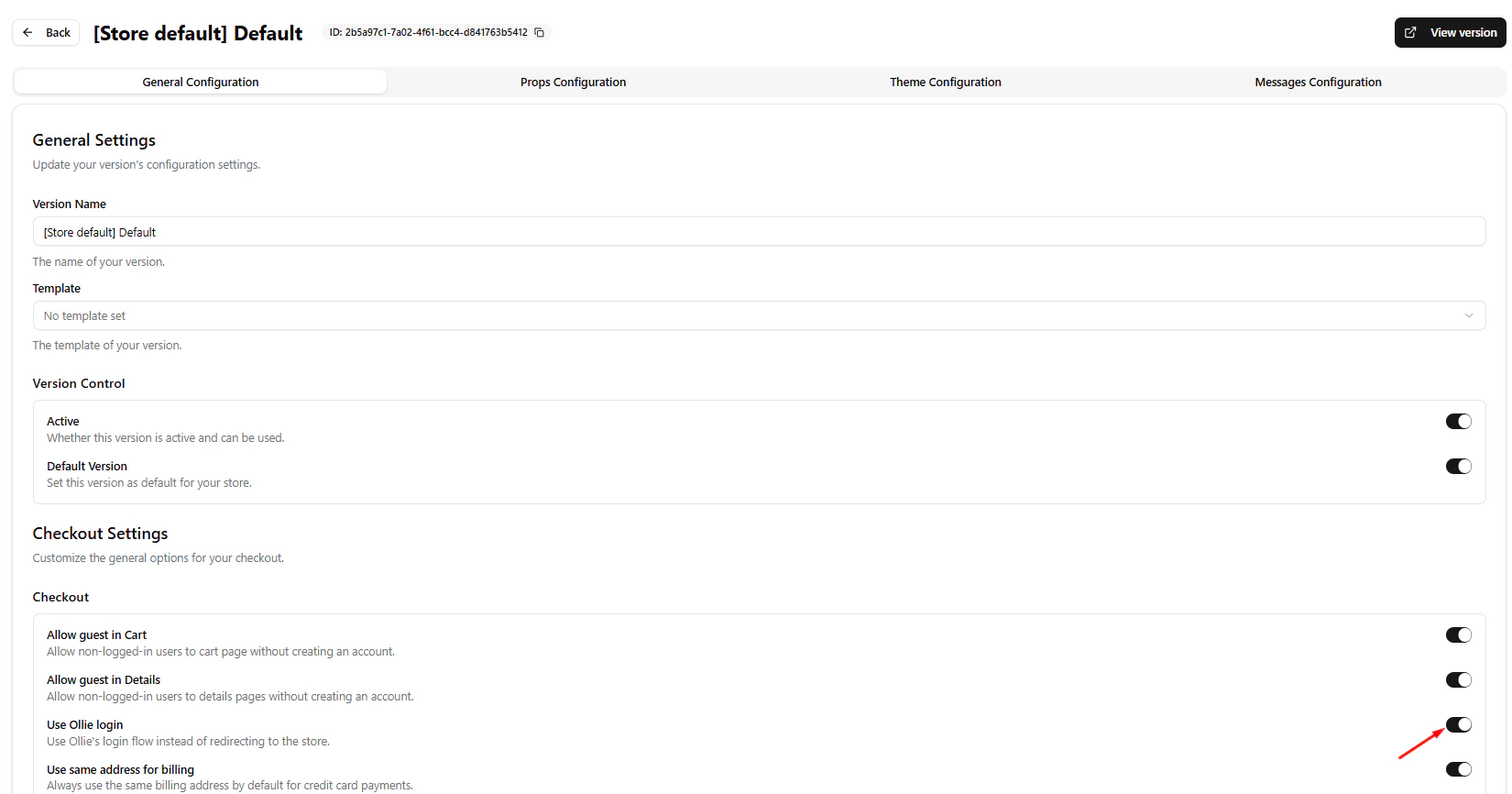
The Ollie Login is configured in the **General Settings** of a [Version](/ollie-shop/concepts/version).
1. Go to your **Store** in the [Admin Dashboard](https://admin.ollie.shop)
2. Select the **Version** you want to configure
3. In **Checkout Settings**, find the **Use Ollie login** toggle
4. Enable or disable as needed
When disabled, clicking "Login" will redirect the user to your e-commerce platform's native login page.
## Behavior
| Setting | Behavior |
| ------------ | ------------------------------------------------------------- |
| **Enabled** | Opens a login modal within the checkout (no page redirect) |
| **Disabled** | Redirects to your platform's login page (VTEX, Shopify, etc.) |
## Related Settings
The login behavior works together with other guest settings in the same section:
| Setting | Description |
| -------------------------- | ------------------------------------------------------------- |
| **Allow guest in Cart** | Allow non-logged-in users to access the cart page |
| **Allow guest in Details** | Allow non-logged-in users to access the details/shipping page |
| **Use Ollie login** | Use the native Ollie login modal instead of redirecting |
If you disable guest access and disable Ollie login, users will be redirected to your platform's login page before accessing the checkout.
## SDK Integration
To programmatically control the login modal in your custom components, use the [useLogin](/ollie-shop/api/useLogin) hook from the SDK.
```typescript theme={"system"}
import { useLogin } from '@ollie-shop/sdk';
const { openLogin, closeLogin } = useLogin();
// Open the login modal
openLogin({ isRequired: true, title: "Sign in to continue" });
```
See [useLogin](/ollie-shop/api/use-login) for full API reference.
## Configuration
The Ollie Login is configured in the **General Settings** of a [Version](/ollie-shop/concepts/version).
1. Go to your **Store** in the [Admin Dashboard](https://admin.ollie.shop)
2. Select the **Version** you want to configure
3. In **Checkout Settings**, find the **Use Ollie login** toggle
4. Enable or disable as needed
When disabled, clicking "Login" will redirect the user to your e-commerce platform's native login page.
## Behavior
| Setting | Behavior |
| ------------ | ------------------------------------------------------------- |
| **Enabled** | Opens a login modal within the checkout (no page redirect) |
| **Disabled** | Redirects to your platform's login page (VTEX, Shopify, etc.) |
## Related Settings
The login behavior works together with other guest settings in the same section:
| Setting | Description |
| -------------------------- | ------------------------------------------------------------- |
| **Allow guest in Cart** | Allow non-logged-in users to access the cart page |
| **Allow guest in Details** | Allow non-logged-in users to access the details/shipping page |
| **Use Ollie login** | Use the native Ollie login modal instead of redirecting |
If you disable guest access and disable Ollie login, users will be redirected to your platform's login page before accessing the checkout.
## SDK Integration
To programmatically control the login modal in your custom components, use the [useLogin](/ollie-shop/api/useLogin) hook from the SDK.
```typescript theme={"system"}
import { useLogin } from '@ollie-shop/sdk';
const { openLogin, closeLogin } = useLogin();
// Open the login modal
openLogin({ isRequired: true, title: "Sign in to continue" });
```
See [useLogin](/ollie-shop/api/use-login) for full API reference.